Error code lookup for forklifts and material handling equipment
Enter the code. Narrow down the cause.
For trucks from various manufacturers, with a description and numbered checks in our own words; under Manufacturers and series you can see the coverage per series. In the browser on a PC as well as on a phone at the truck.
Plus fleet, inspection dates and error documentation depending on the plan; reporting problems by QR code at the truck and service cases are planned.
- 7 days free, no payment method
- Works in the browser right away
- Servers in Germany
- App for iOS and Android in preparation
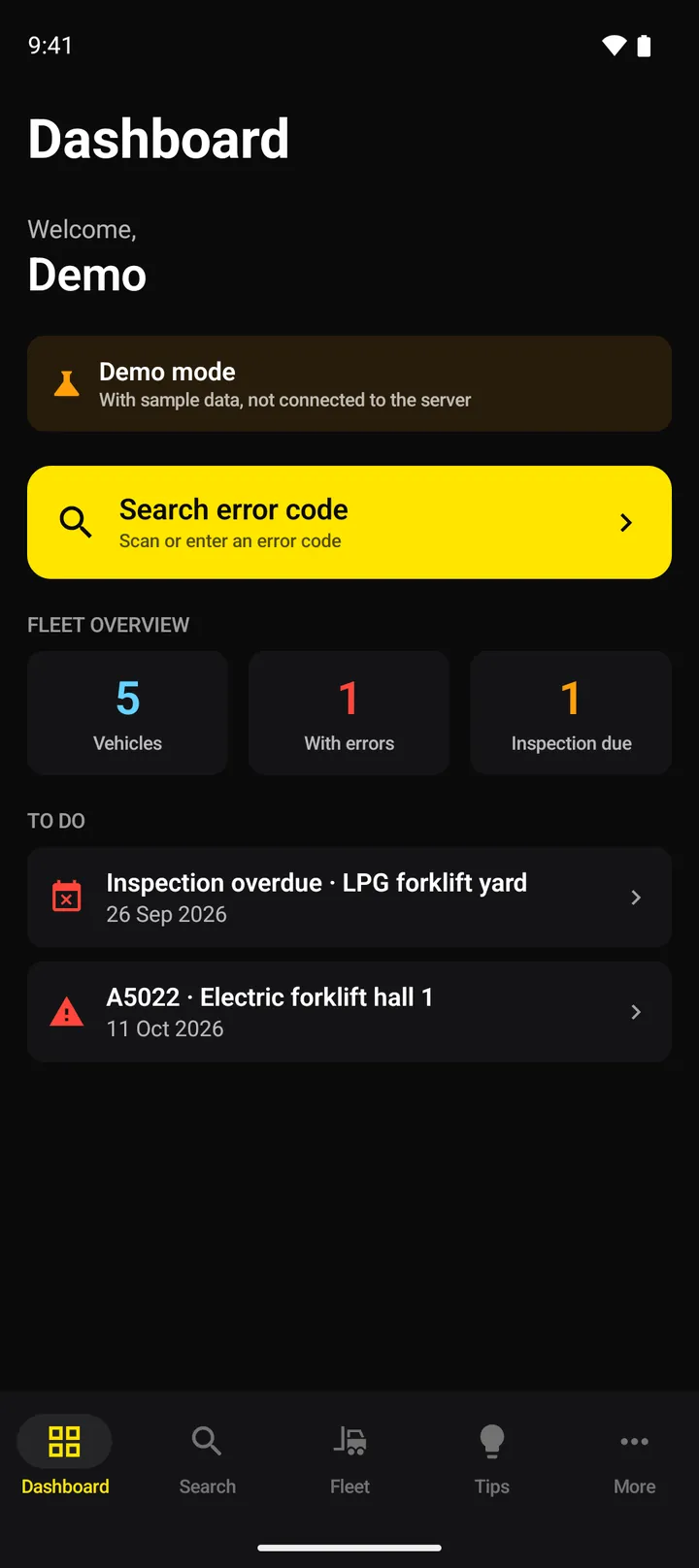
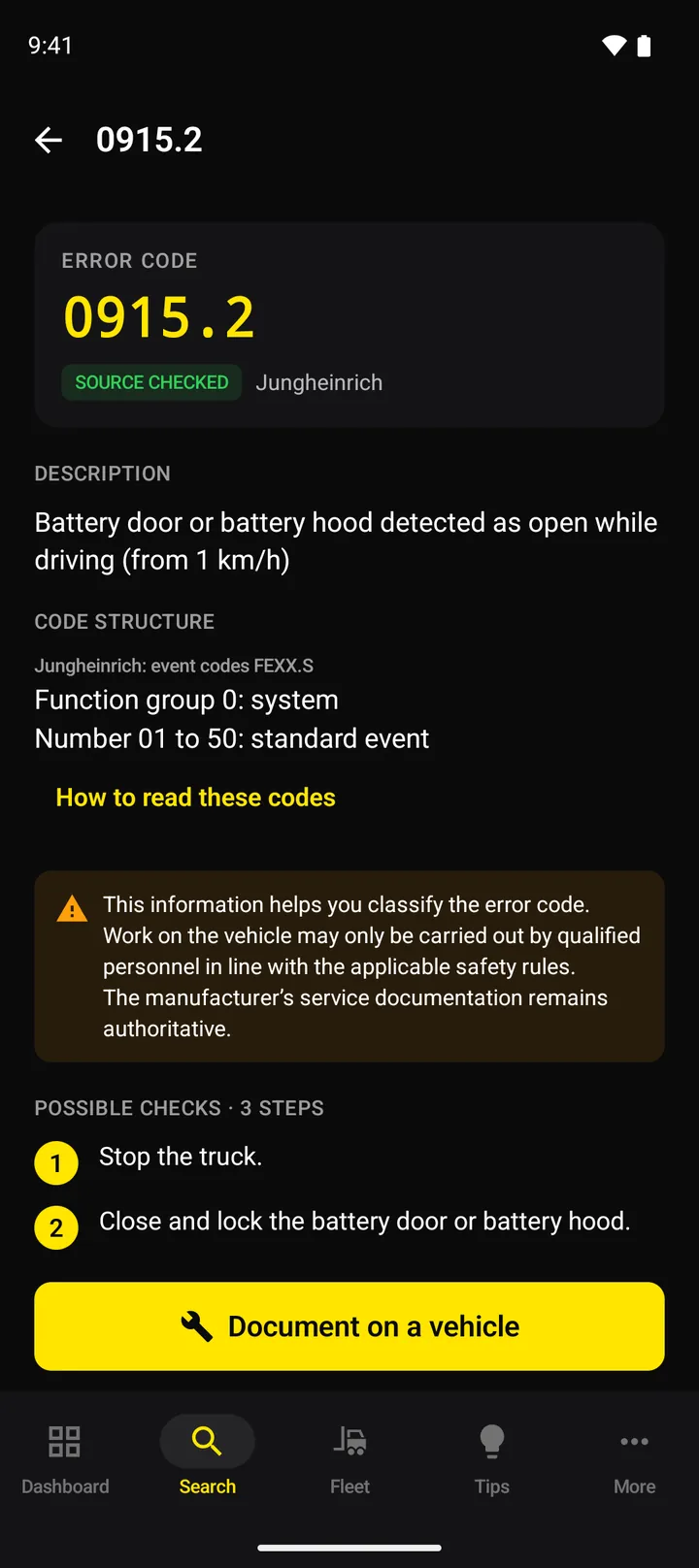
The database is growing continuously. Manufacturer and brand names are used for identification only; there is no affiliation with the manufacturers.
Why ForkScan Pro
Less searching through binders and PDFs
An error code on the display, the truck at a standstill, and the answer is somewhere in binders, PDFs or with the manufacturer's service.
Without ForkScan Pro
- Searching for error codes in PDF manuals and binders
- Every manufacturer names and explains its codes differently
- Searching for a long time before it is clear whether service needs to be called
With ForkScan Pro
- Enter the code and read what it means according to the source
- Error codes from various manufacturers in one database, presented consistently
- Go through the possible checks in order; work on the truck by qualified personnel
How it works
Three steps to classify an error code
1. Enter the code
Type the code exactly as the display shows it. In the app, which is being prepared for release, the camera can read it as well.
2. Read the meaning and the checks
You see what the error means according to the source and possible checks in a sensible order. Work on the truck belongs in the hands of qualified personnel.
3. Document the incident
Record the error on the vehicle with notes and photos. This builds up an error history.
Apps for iOS and Android, in preparation
In the warehouse, in the workshop, on the road
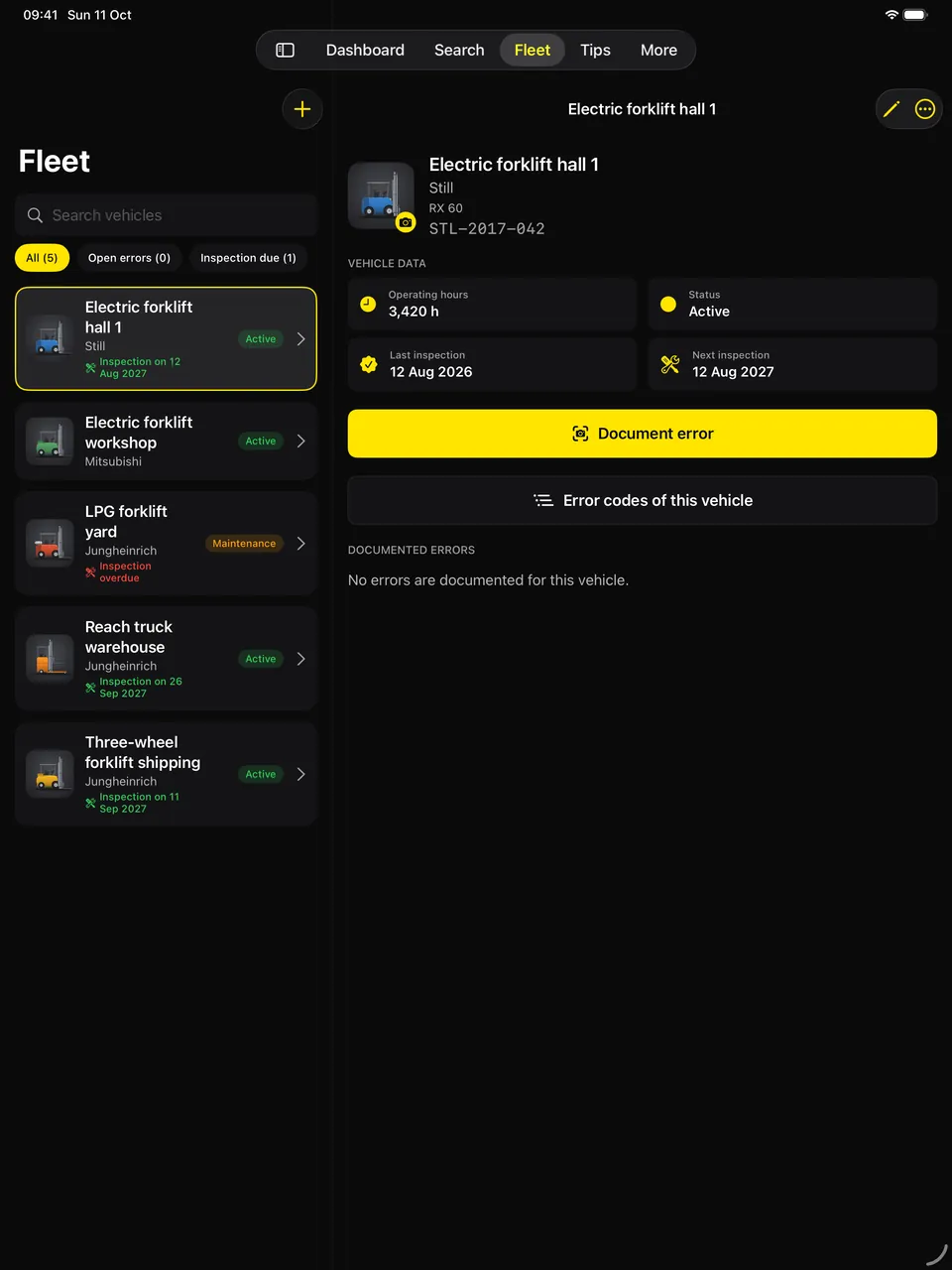
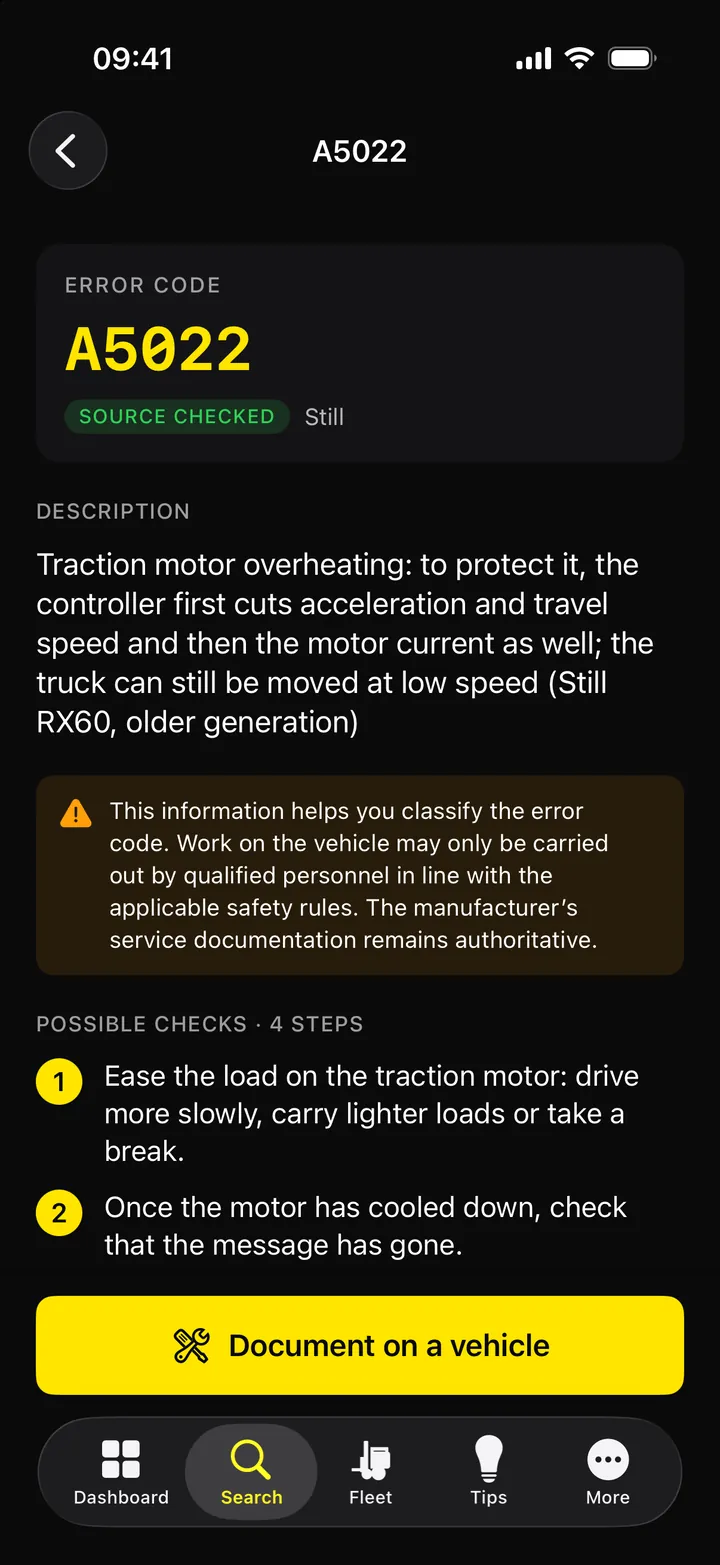
The apps, which are being prepared for release, work with the same data as the customer portal. On a tablet the list and the details sit side by side; on a phone the error code is at hand right at the truck.
- Type the error code or capture it from the truck's display with the camera
- Fleet, inspection dates and documented errors, in sync with the customer portal
- With a plan with fleet management: the offline pack with the released error codes for your fleet, also without a network
Features
Error codes, fleet and documentation in one tool
Error codes are available in the browser; fleet, inspection dates and error log depending on the plan. Offline use and the camera scanner come with the app for iOS and Android, which is being prepared for release.
Error codes from various manufacturers, presented consistently
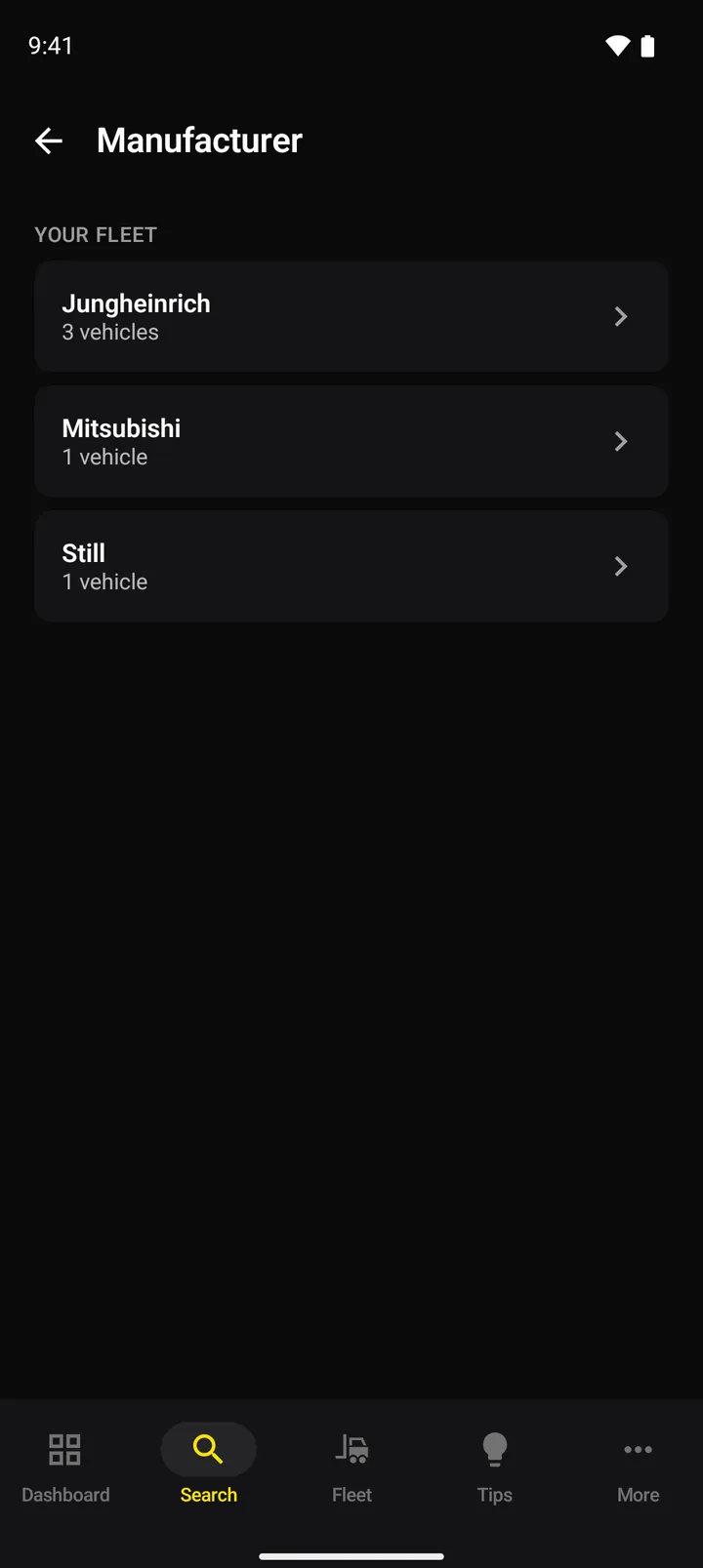
Still, Jungheinrich or Mitsubishi: you enter the code and read what it means according to the source and which checks to consider. Manufacturer and model names are used for identification only.
- Error codes from different manufacturers in one consistent format
- Possible checks, numbered and in our own words
- Tools and spare parts with part numbers once they are recorded for the code; the catalogue is being built
- You only see released codes with a documented source; community tips are kept apart below and are not individually checked by us
Also included
Offline in the app (after release)
With a plan with fleet management, the app downloads the released error codes for your fleet to the device in advance, not during the trial; codes already looked up and the fleet remain available without a network.
Tips
Users share their fixes and mark what helped. The best-rated tips come first; they come from other users and are not individually checked by us.
Camera scanner in the app (after release)
In the app, the camera reads the code from the display. Recognition runs on the device.
For the whole team
Several users and devices depending on the plan. The customer portal shows which devices are connected.
Platform
One platform, four areas
The error code search is where it starts. Pro, Fleet, Report and Service are areas of the same product, not separate plans; each area shows how much of it is available today.
ProDiagnosis
AvailableLook up error codes from various manufacturers: meaning, possible checks and code structure, and where recorded the cause, tools and spare parts.
More about ProFleetOwn fleet
Partly availableVehicles with status and operating hours, inspection dates, documented errors and reports, depending on the plan; a device record with QR code, defects and blocking are planned.
More about FleetReportReports at the truck
PlannedReport problems right at the truck by QR code, with a photo and without signing in, so that the report reaches the people responsible.
More about ReportServiceCustomer fleets
PlannedCustomers, customer devices, service cases and appointments in one flow, up to the finished PDF report.
More about Service
Who it is for
For everyone who keeps forklifts running
Service technicians
At the customer's, in front of the truck: look up the code, assess the checks and, depending on the plan, record the incident.
- Various manufacturers in one search
- Possible checks in order
- Camera scanner and offline use in the app once it is released
Workshops
The team's knowledge in one place, also for brands that do not come in every day.
- Several users and devices
- Tips from the community
- Error history for every vehicle
Fleet operators
Every vehicle at a glance: status, operating hours and the next inspection.
- Reminder before scheduled inspections
- Reports with Excel and PDF export
- Errors traced per vehicle
Downtime
What does downtime cost your fleet?
Calculate with your own figures.
Every hour less downtime per vehicle equals
2,125 €
Downtime cost per year
0€
Example calculation with your figures. No promise of achievable savings.
Roadmap
What is here and what is coming
What you get today and what we are working on.
Available
Usable in the browser today
Web platform
- Error code search across manufacturers
- Tips from the community
- Customer portal for your team
- Fleet management with status and operating hours
- Inspection dates with email reminders
- Reports with Excel and PDF export
- Error documentation with photos and status
In progress
Built or being built
Mobile app
Fully developed for iOS and Android: search, camera scanner, fleet maintenance and offline cache. The apps are being prepared for the App Store and Google Play.
Offline pack
Fully developed in the app, which is being prepared for release: the released error codes for your own fleet are downloaded to the phone and looked up without a network. A selection, not the whole database.
Database expansion
Further manufacturers, device types and reviewed error codes. Tools and spare parts for each error code: the display is ready, the catalogue is being built, with part numbers from truck manufacturers and suppliers, for identification only.
Planned
Intentions without a fixed date
Inspection reports
Creating inspection reports digitally, directly in the app.
Wiring notes
Notes on wiring and connectors in our own presentation, as far as sources and rights allow.
Connected parts catalogues
We are looking into connecting parts lists from dealers and manufacturers, for more spare parts per code.
API access
Interface that lets your own systems access the fleet and the error history.
AI troubleshooting assistant
Support for troubleshooting based on the error history.
Pricing
Plans
Error code access for technicians, workshops and fleets.
All prices are net plus VAT. After signing up you can test for 7 days free of charge without a payment method, with all features except the offline pack and up to 3 error code lookups a day for your company. Afterwards your data stay readable for 12 months and are deleted if no plan is running by then. A subscription only starts with your order; if you order during the trial, the trial ends with the order, and billing only starts at its original end, at the earliest two days after the order. The subscription is billed monthly in advance, renews month by month and can be cancelled at the end of the billing period.
The offer is for businesses only.
Try it free for 7 days
With all features except the offline pack and up to 3 error code lookups a day for your company. The trial ends automatically; a subscription only starts with your order.
- No payment method
- Instant access
- Your data stay readable for 12 months after the trial